
Quick Answers
Keyboard Shortcuts
LivePlan has several keyboard shortcuts built in, allowing users to navigate between sections of their business plan quickly.
To use the keyboard shortcuts in LivePlan, type the following combinations sequentially:
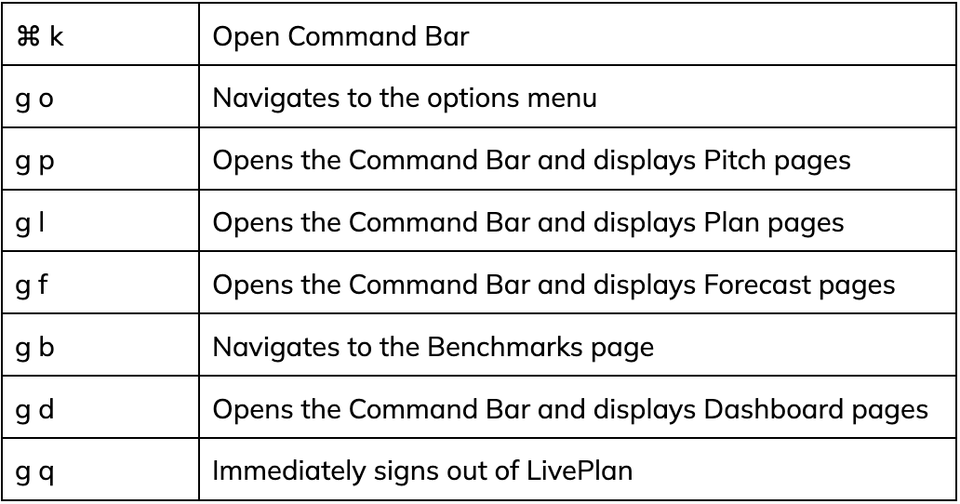
A list of various components within the selected section will be displayed when using keyboard navigation shortcuts that open the Command Bar. For instance, typing "gp" (without spaces or quotes) will bring up a list of different Forecast pages that you can navigate to, as shown in the example below:
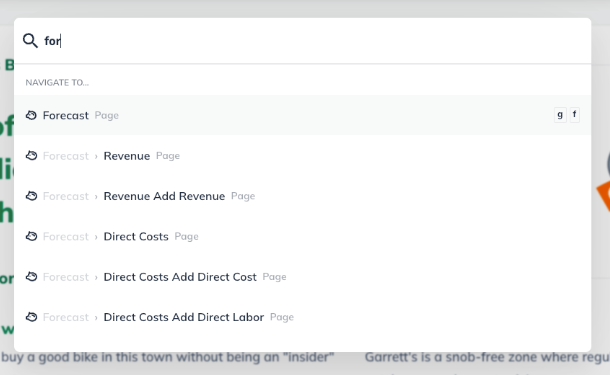
Select one of the options from the list, or click outside of the Command Bar to return to your previous page.
Note: Keyboard shortcuts are only active when you are not typing in a section of LivePlan, such as a Forecast entry or a Plan topic.